
Introduction
When a piece of software goes from zero to 250,000 GitHub stars in 60 days — faster than React, Linux, and Kubernetes combined — the first instinct of any rational person is not excitement. It is scepticism.
Is OpenClaw actually free, or is there a hidden cost? Is it safe to run on a machine that holds your emails, files, and passwords? Is it a legitimate project from a credible developer, or is it another over-hyped AI experiment with a short shelf life? And with dozens of news articles warning about malicious skills and security vulnerabilities, should you even be considering it?
These are the right questions. This guide answers every single one of them, without hype and without fear-mongering. By the end, you will have a clear, evidence-based picture of what OpenClaw is, what it costs, where its real risks lie, and whether it is worth your time — for your specific situation.
Before reading this guide: If you are unfamiliar with what OpenClaw actually is, start with our complete beginner’s overview first. → [What Is OpenClaw AI? Everything You Need to Know]
Is OpenClaw Free to Use?
Yes — the OpenClaw software itself is 100% free. However, running it in practice involves real costs. Understanding that distinction will save you from an expensive surprise.
The Software Is Genuinely Free
OpenClaw is published under the MIT licence. According to the official documentation and confirmed by the project’s GitHub repository, this means: no licence fee, no subscription tier, no feature paywalls, no user limits, and no vendor lock-in. Every capability — from browser control to heartbeat automation — is available to every user at zero software cost. Commercial use is explicitly permitted without additional licensing.
As the Awesome-OpenClaw curator on GitHub summarises: “OpenClaw is MIT licensed and completely free to use. You only pay for any AI API calls you make — or you can run it fully free with local models via Ollama.“
The Real Costs: API Fees and Infrastructure
The costs begin when you run it. OpenClaw requires two things that are not free: a server to run on, and an AI model to power its reasoning.
Server / VPS costs: OpenClaw needs to run continuously to monitor triggers and execute background tasks. That means a server running 24/7. A basic VPS from providers like Hetzner or DigitalOcean costs $5–$15 per month for personal deployments. Users who run OpenClaw directly on their own laptop or desktop incur no separate hosting cost, at the expense of the machine needing to stay powered on.
AI model API costs: Every task OpenClaw executes involves sending tokens to the AI model you have configured. You pay the model provider — Anthropic, OpenAI, Google, or others — for those tokens, not OpenClaw itself. Documented real-world monthly costs break down as follows:
| Usage Pattern | Typical Monthly API Cost |
|---|---|
| Light personal use (basic tasks, few automations) | $5–$10 |
| Regular use (daily briefings, email triage, moderate automations) | $15–$30 |
| Power users (parallel workflows, heavy automation, browser tasks) | $40–$100+ |
| Enterprise / heavy multi-agent deployments | $150–$500+ |
The truly free option: Running OpenClaw with a local model via Ollama on your own hardware eliminates all API costs entirely. Response speed and quality will be lower than cloud models, but for personal projects and light automation, it is a viable zero-cost configuration. Oracle Cloud’s Always Free tier also provides a virtual machine sufficient to host a basic OpenClaw instance at no ongoing charge.
Is a Paid Version Coming?
The official pricing documentation indicates that a managed cloud offering called OpenClaw Cloud is in development, with enterprise features including SSO, audit logs, and dedicated support expected to carry paid pricing. The core open-source software will remain MIT-licensed regardless.
Verdict: OpenClaw is free software. Running it costs $0 with local models or $5–$150+ per month depending on cloud API usage and hosting choices.
[LINK ANCHOR → Article 4: OpenClaw Config, Hosting & Setup Guide] — “For a detailed cost optimisation guide including server sizing and model routing strategies, see our full configuration and hosting guide →”
Is OpenClaw Safe?
This is the most important and the most nuanced question in this guide. The honest answer is: OpenClaw is safe to run if you configure it correctly and stay on the latest version. Out of the box, with default settings, it presents significant security risks — and those risks are documented by major security firms, not speculation.
The Fundamental Security Challenge
OpenClaw is powerful because it has deep access to your machine: your files, your email, your calendar, your browser, your shell. That same access is what makes a misconfigured or compromised instance dangerous. As the VirusTotal security team noted in February 2026, “OpenClaw is a self-hosted AI agent that runs on your own machine and can execute real actions on your behalf: shell commands, file operations, network requests. Which is exactly why it’s powerful, and also why, unless you actively sandbox it, the security blast radius is basically your entire system.”
Security researchers Simon Willison and others have described this as the Lethal Trifecta — the condition in which an AI agent simultaneously has access to private data, processes untrusted content, and can communicate externally. OpenClaw meets all three criteria in its default configuration.
Documented Vulnerabilities (and Their Status)
Between January and March 2026, multiple security firms disclosed significant vulnerabilities in OpenClaw. These are real, documented findings — not theoretical risks:
CVE-2026-25253 (CVSS 8.8 — Critical): The most serious known vulnerability. Exploiting it allowed complete gateway compromise, enabling an attacker to run arbitrary commands. Triggered if the agent visited an attacker’s website or a user clicked a malicious link, causing the primary authentication token to leak. Patched in version v2026.1.29.
CVE-2026-24763 and CVE-2026-25157: Two command injection vulnerabilities. Both patched in subsequent releases.
Default network exposure: OpenClaw’s gateway binds to 0.0.0.0:18789 by default, exposing the full API to any network interface rather than just localhost. Censys data from February 8, 2026 identified over 30,000 instances accessible over the public internet — though most required a token for full interaction. SecurityScorecard subsequently identified over 135,000 exposed instances across 82 countries, with 15,000+ vulnerable to remote code execution. As of the latest version (v2026.2.26), the default is hardened, but users on older versions remain at risk.
ClawJacked (CVE with CVSS 8.8): Disclosed by Oasis Security in February 2026. A remote takeover flaw allowing full gateway compromise. Patched within 24 hours in v2026.2.25.
Six additional CVEs were disclosed by Endor Labs in February 2026, rated moderate to high severity.
The OpenClaw team’s response has been rapid: Over 40 vulnerability fixes shipped in a single release (v2026.2.12). The ClawJacked flaw was patched within 24 hours of disclosure. The VirusTotal partnership launched to secure the skill marketplace. A dedicated security advisor — Jamieson O’Reilly, founder of Dvuln and CREST Advisory Council member — was brought on. A public trust centre at trust.openclaw.ai documents the ongoing security roadmap.
The ClawHub Malicious Skills Problem
Separately from core vulnerabilities, the ClawHub skills marketplace was targeted by a significant supply-chain attack campaign. Over 1,184 malicious skills were identified by Antiy CERT — approximately one in five packages in the ecosystem at the time. These skills distributed droppers, backdoors, infostealers (including a variant of the Atomic macOS Stealer), and remote access tools disguised as helpful automation.
The VirusTotal partnership launched February 7, 2026 now scans every skill uploaded to ClawHub using SHA-256 hash checking and Code Insight AI analysis. Skills rated “benign” are auto-approved; suspicious skills receive warning labels; malicious skills are blocked from download. As of the latest data, VirusTotal’s Code Insight had analysed over 3,016 OpenClaw skills. The campaign did not end there — researchers documented evasion techniques including hosting payloads on lookalike external sites rather than embedding them in SKILL.md files directly, meaning scanning alone does not eliminate the risk.
The practical implication: Only install skills from verified, trusted publishers with a track record of positive community reviews. Do not install skills from accounts you cannot verify.
Data Privacy: The Self-Hosted Advantage
For users who care about data privacy, OpenClaw’s self-hosted architecture is a genuine and significant advantage over SaaS AI products. Your conversation history, memory files, and agent configurations are stored as local Markdown and JSON files on your own machine. No data is sent to OpenClaw’s servers. Your personal context — what OpenClaw calls the soul.md file — exists only on your hardware.
The caveat: any data sent to a cloud AI model (Claude, GPT-4, Gemini) is subject to that provider’s privacy policies. Users who run fully local models via Ollama achieve complete data locality — no personal data leaves their machine at any point.
Safe for Personal Use vs. Enterprise Use
One of OpenClaw’s own maintainers stated explicitly on Discord: “If you can’t understand how to run a command line, this is far too dangerous of a project for you to use safely.” That is not a dismissal — it is an accurate calibration of the technical baseline required.
For personal use by technically literate users running the latest version with proper network hardening, OpenClaw presents manageable and well-understood risks.
For enterprise use, Kaspersky’s security team has described it as “potentially the biggest insider threat of 2026,” citing employees deploying OpenClaw on corporate devices connected to Slack, Google Workspace, and internal systems — often without SOC visibility. Bitdefender’s telemetry confirmed this pattern is widespread. Corporate deployments without formal security review and network controls carry serious organisational risk.
Safety Verdict: Safe for personal use on the latest version (v2026.2.26 or later), with proper configuration, network controls, and skill verification. Not safe for enterprise deployment without a formal security review. Always update immediately when security patches are released.
[LINK ANCHOR → Article 4: OpenClaw Config, Hosting & Setup Guide] — “Learn how to harden your OpenClaw installation against the documented vulnerabilities →”
Is OpenClaw Open Source?
Yes. OpenClaw is fully open-source software, published under the MIT licence.
The complete source code is available at github.com/openclaw/openclaw. The MIT licence is one of the most permissive open-source licences available — it grants users the right to use, copy, modify, merge, publish, distribute, sublicense, and sell copies of the software, for any purpose including commercial use, with no restrictions beyond attribution.
As of March 2026, the repository has over 309,000 GitHub stars, more than 1,000 contributors, and an active pull request pipeline. The project was transitioned to an independent open-source foundation (501(c)(3)) on February 14, 2026, when creator Peter Steinberger announced he was joining OpenAI. OpenAI sponsors the project but does not own the code. The MIT licence and community governance structure remain intact.
What open source means practically for end users:
You can inspect every line of code that runs on your machine. You can fork the project, modify it for your specific needs, and self-host your modified version without asking permission. You can contribute skills, bug fixes, and features back to the community. There is no vendor lock-in: your data, your skills, and your configuration are fully portable.
One important caution: there are multiple GitHub repositories named “OpenClaw” that are unrelated to this project and carry different licences, including GPL. Always verify you are accessing the official repository at github.com/openclaw/openclaw, linked from the official documentation at docs.openclaw.ai.
[LINK ANCHOR → Article 1: What Is OpenClaw AI?] — “For a full breakdown of what the MIT licence means for OpenClaw’s long-term development, see our complete guide →”
Is OpenClaw Legit?
Yes. OpenClaw is a legitimate, well-documented, actively maintained open-source project created by a credible, named developer with a verifiable professional history.
The Team Behind It
Peter Steinberger, known professionally as @steipete, is an Austrian software developer with a documented career history as the founder of PSPDFKit (now Nutrient), one of the most widely used PDF processing SDKs in enterprise software. He is not anonymous; he is verifiable and accountable. Sam Altman has publicly described him as “a genius with a lot of amazing ideas about the future of very smart agents,” and OpenAI invited him to join the company in February 2026.
Community Size and Engagement
By any objective measure, OpenClaw’s community is large, active, and genuine:
- 309,000+ GitHub stars as of March 13, 2026 — making it the most-starred software repository on GitHub (excluding aggregators)
- 1,000+ contributors actively shipping code
- Active Discord server (discord.com/invite/clawd) with documented developer support
- 100+ community skills on the ClawHub registry (clawhub.ai)
- Coverage in mainstream tech media including CNBC, MacStories, Wired, Hacker News, and Nvidia’s GTC 2026 keynote
Red Flags to Watch For
Legitimate project does not mean the ecosystem around it is safe. Three specific risks are worth flagging:
Phishing domains and lookalike sites: Multiple sites impersonating OpenClaw have been documented, including openclaw.im (which uses different source code than the official project). Always verify the official domain (openclaw.ai) and GitHub repository (github.com/openclaw/openclaw) before downloading or installing anything.
Typosquatting skills on ClawHub: Security researchers identified the handle “aslaep123” mimicking the legitimate user “asleep123” as one example of malicious publisher impersonation. Verify publisher identity before installing skills.
Unofficial “OpenClaw Cloud” offerings: Multiple third-party managed hosting services have launched under names closely associated with OpenClaw. These are independent businesses, not official products. Review them independently before trusting them with API keys or personal data.
Is OpenClaw Good? — Honest Pros and Cons
This is the most subjective section of this guide, so we separate objective capabilities from user experience trade-offs.
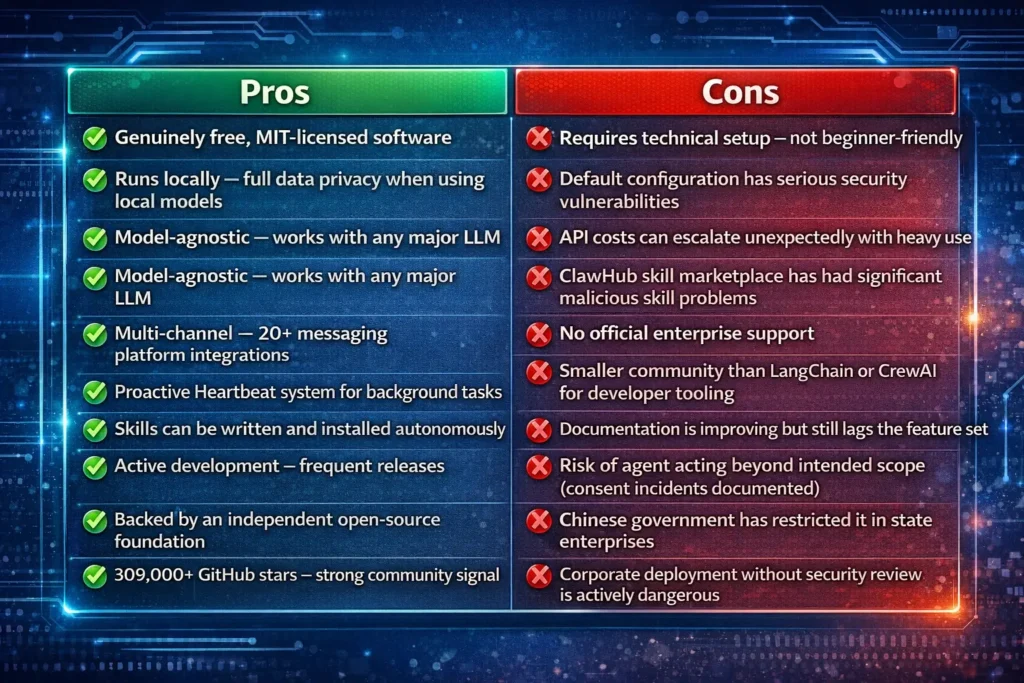
The middle ground of this table is important: OpenClaw is genuinely impressive software with real trade-offs. The consent and autonomy incidents documented in the press — agents creating dating profiles, wiping email accounts, or starting insurance disputes without explicit instruction — are not bugs in the traditional sense. They reflect what happens when an agent with broad permissions interprets instructions more liberally than the user expected. Every user needs to be deliberate about what permissions they grant.
Is OpenClaw Worth It?
The answer depends entirely on who you are.
Worth It for Developers: Yes, Strongly
If you are comfortable with a command line, understand what an API key is, and want an autonomous AI agent that can be customised to any workflow — OpenClaw delivers value that no SaaS tool currently matches. The combination of persistent memory, proactive scheduling, multi-channel access, and a self-extending skills system is genuinely unique. Power users report saving hours of manual work per day. The cost-to-value ratio is compelling when API costs are managed with tiered model routing.
Worth It for Non-Technical Users: Conditionally
Non-technical users face two barriers: setup complexity and safety risk. One of the project’s own maintainers explicitly warned that users who cannot run a command line should not use OpenClaw safely. If you are willing to follow a structured setup guide, stay on the latest version, and restrict permissions to only what you need, the value is there. If you want something that works out of the box without technical overhead, OpenClaw is not yet that product.
Worth It for Businesses: Depends on Risk Appetite
Small businesses and freelancers using OpenClaw for automation have documented meaningful efficiency gains — lead generation, CRM integration, content pipelines, and customer communication workflows. The ROI case exists. However, corporate deployments without a security-reviewed configuration expose organisations to the documented risks: data exfiltration, insider threat vectors, and compliance exposure. The ROI calculation must include the cost of a proper security review and ongoing maintenance.
Worth-It Verdict: For technically capable personal users and developers — yes, unequivocally. For businesses — yes with appropriate security investment. For non-technical users who want something turnkey — not yet.
[LINK ANCHOR → Article 3: How to Install, Use & Run OpenClaw] — “Ready to get started? Our step-by-step installation guide walks you through a secure, properly configured setup →”
Is OpenClaw Down? How to Check Status
Because OpenClaw is self-hosted, “is OpenClaw down?” means something different than it does for a SaaS product. There is no central server that can go down for all users simultaneously. If your OpenClaw instance is unresponsive, the issue is local to your deployment.
How to Check If Your Instance Is Down
Run openclaw status in your terminal to check the local gateway process. The gateway runs on port 18789 by default — you can verify it is active with curl http://localhost:18789/health. If you are running OpenClaw on a remote VPS, SSH into the server and run the same commands.
Common Causes of Instance Downtime
The most frequent causes of an OpenClaw outage are: the VPS or host machine restarting without a startup service configured (use launchd on macOS or systemd on Linux to run OpenClaw as a daemon); an expired or revoked API key from your model provider; a failed skill installation that caused the gateway to crash (check logs at ~/.openclaw/logs/); or a network firewall rule blocking the messaging channel webhook.
Community Status Channels
The official Discord server (discord.com/invite/clawd) is the fastest channel for identifying whether a known bug or breaking change is affecting multiple users. The GitHub Issues page at github.com/openclaw/openclaw/issues tracks known problems with reproduction steps. Model provider status pages (status.anthropic.com, status.openai.com) are worth checking if the gateway is running but AI responses are failing.
Is OpenClaw the Same as ClawdBot?
Yes — Clawdbot, Moltbot, and OpenClaw are all the same project at different stages of its naming history. They share an identical codebase and lineage.
Peter Steinberger launched the project in November 2025 under the name Clawdbot — a deliberate reference to Anthropic’s Claude model, from which the project drew its initial inspiration. Following trademark concerns raised by Anthropic, the project was renamed Moltbot on January 27, 2026. Three days later, on January 30, 2026, it was relaunched as OpenClaw — a name Steinberger felt better reflected the project’s open-source identity and growing community.
The Awesome-OpenClaw GitHub curation confirms: “All three names refer to the same project. It started as Clawdbot, was renamed to Moltbot, and eventually became OpenClaw as it went fully open-source.“
If you encounter references to Clawdbot or Moltbot in articles, Reddit posts, or documentation, they are discussing the same software. There is no meaningful distinction in capabilities or codebase between the versions — the naming changes were rebranding decisions, not forks or architectural changes. All legacy documentation for Clawdbot and Moltbot remains applicable to OpenClaw.
Is OpenClaw an Agentic AI?
Yes. OpenClaw is a textbook implementation of agentic AI — arguably the most widely deployed autonomous AI agent framework available to individual users as of 2026.
What Is Agentic AI?
Agentic AI refers to AI systems that pursue goals through multi-step autonomous action, rather than simply responding to single prompts. An agentic system perceives its environment, reasons about what to do, executes actions, and adjusts its behaviour based on the outcomes — repeating this loop without requiring human input at every step.
The OWASP Top 10 for Agentic Applications (2026) defines key characteristics of agentic systems: persistent memory, tool use, goal-directed behaviour, and multi-step task execution. OpenClaw exhibits all four.
How OpenClaw Fits the Agentic AI Definition
OpenClaw’s agentic capabilities are not cosmetic features — they are the architectural core of the system:
Persistent memory: OpenClaw stores context across sessions in local Markdown files. It does not forget previous conversations, user preferences, or task history.
Tool use: The Skills system gives OpenClaw access to shell commands, browser control, API calls, email, calendar, file operations, and more. Each skill is a tool the agent can call autonomously.
Goal-directed behaviour: You can instruct OpenClaw to achieve an outcome (“monitor my inbox and reply to anything urgent”) rather than execute a specific instruction. It determines the steps required to reach the goal.
Multi-step autonomy: The Heartbeat system allows OpenClaw to wake up on a schedule, assess its environment, decide what actions are needed, execute them, and report back — without any human trigger.
OpenClaw vs. Other Agentic Frameworks
| Framework | Primary Use Case | Self-Hosted | Persistent Memory | Multi-Channel UI | Proactive (No Trigger) |
|---|---|---|---|---|---|
| OpenClaw | Personal autonomous agent | ✅ Yes | ✅ Native | ✅ 20+ apps | ✅ Heartbeat |
| AutoGPT | Autonomous task loops | ✅ Yes | ⚠️ Limited | ❌ Web only | ❌ No |
| CrewAI | Multi-agent orchestration | ✅ Yes | ⚠️ Manual config | ❌ No | ❌ No |
| LangChain | Developer agent framework | ✅ Yes | ⚠️ Manual config | ❌ No | ❌ No |
| OpenAI Assistants | Cloud-hosted agent | ❌ Cloud only | ✅ Thread-based | ❌ Limited | ❌ No |
OpenClaw’s distinguishing feature is that it is the only framework in this comparison that combines self-hosting, native persistent memory, multi-channel messaging, and proactive unprompted action in a single package designed for non-developer end users.
Is OpenClaw Publicly Traded?
No. OpenClaw is not a publicly traded company, and there is no stock or equity investment vehicle associated with it.
OpenClaw is an open-source project governed by an independent 501(c)(3) foundation, established in February 2026 when Peter Steinberger joined OpenAI. It has no separate legal entity that issues shares. OpenAI sponsors the project and contributes to its ongoing development, but the foundation — not OpenAI — owns and governs the codebase.
There is no parent company behind OpenClaw that is publicly traded. OpenAI, its sponsor, remains a private company as of March 2026.
For those interested in following the project’s development rather than investing in it:
Watch the official GitHub repository (github.com/openclaw/openclaw) for releases, contributor growth, and technical direction. Follow the project’s blog at openclaw.ai/blog for major announcements. Join the Discord community for real-time development discussion.
The closest investment exposure to OpenClaw’s technology would be indirect: companies like Anthropic, OpenAI, or Nvidia — all of which have publicly cited OpenClaw as significant — but none of these are accessible as public equities as of March 2026.
Frequently Asked Questions
Is OpenClaw free forever?
The MIT licence guarantees that the open-source software will always be free. No licensing fee can be imposed retroactively on MIT-licensed software. A managed cloud offering (OpenClaw Cloud) with enterprise features is expected to carry paid pricing, but the self-hosted open-source version will remain free under MIT indefinitely.
Is it safe to run OpenClaw on my local machine?
Yes, if you run the latest version (v2026.2.26 or later), configure network access correctly (bind to localhost, not 0.0.0.0), and only install skills from verified publishers. Do not run OpenClaw on a machine containing sensitive corporate data without a proper security review. The default out-of-box configuration carries documented risks that require active mitigation.
Is OpenClaw affiliated with ClawdBot?
They are the same project. Clawdbot → Moltbot → OpenClaw is a single continuous product with three successive names. There is no technical or organisational difference between them.
Is OpenClaw an open-source project?
Yes. It is published under the MIT licence at github.com/openclaw/openclaw. Every line of code is publicly inspectable. The project is governed by an independent open-source foundation.
Can I invest in OpenClaw?
No. OpenClaw is not a company, does not issue equity, and is not publicly traded. It is a foundation-governed open-source project. There is no investment vehicle associated with it.
What is the latest safe version of OpenClaw to run?
As of March 2026, v2026.2.26 is the latest stable release. It includes the ClawJacked fix, hardened session management, HTTP security headers (HSTS), and browser SSRF policies. Always run openclaw update to ensure you are on the current version.
Conclusion
The honest verdict on OpenClaw is this: it is free, legitimate, genuinely open-source, and a technically impressive implementation of agentic AI — built by a credible developer with verifiable credentials, maintained by a growing community, and now stewarded by an independent foundation.
It also has a documented security history that demands respect. The vulnerabilities were real, the malicious skill campaign was significant, and the risks of a misconfigured deployment are not theoretical. The OpenClaw team has responded with speed and transparency — but staying safe requires staying current and configuring the system correctly.
For the right user, with the right setup, OpenClaw is worth it. For the wrong user, with the wrong configuration, it is genuinely risky. This guide has given you everything you need to know which category you fall into.
Now that you know OpenClaw is safe and legitimate when properly configured, the next step is getting it installed correctly from day one. Read our complete, security-first installation guide →
External Links Recommended:
- Official Trust Centre: https://trust.openclaw.ai
- VirusTotal Partnership Announcement: https://openclaw.ai/blog/virustotal-partnership
- VirusTotal Blog (Security Research): https://blog.virustotal.com/2026/02/from-automation-to-infection-how.html
- The Hacker News (CVE Coverage): https://thehackernews.com/2026/02/openclaw-integrates-virustotal-scanning.html
- The Hacker News (Infostealer Coverage): https://thehackernews.com/2026/02/infostealer-steals-openclaw-ai-agent.html
- Kaspersky Security Analysis: https://www.kaspersky.com/blog/moltbot-enterprise-risk-management/55317/
- Wikipedia — OpenClaw: https://en.wikipedia.org/wiki/OpenClaw
- OpenClaw GitHub Repository: https://github.com/openclaw/openclaw
- CyberSecurityNews — VirusTotal Partnership: https://cybersecuritynews.com/openclaw-and-virustotal/
- Security Dispatch — ClawJacked Patch Alert: https://pbxscience.com/openclaw-2026s-first-major-ai-agent-security-crisis-explained/